🔌 Indexer API Documentation
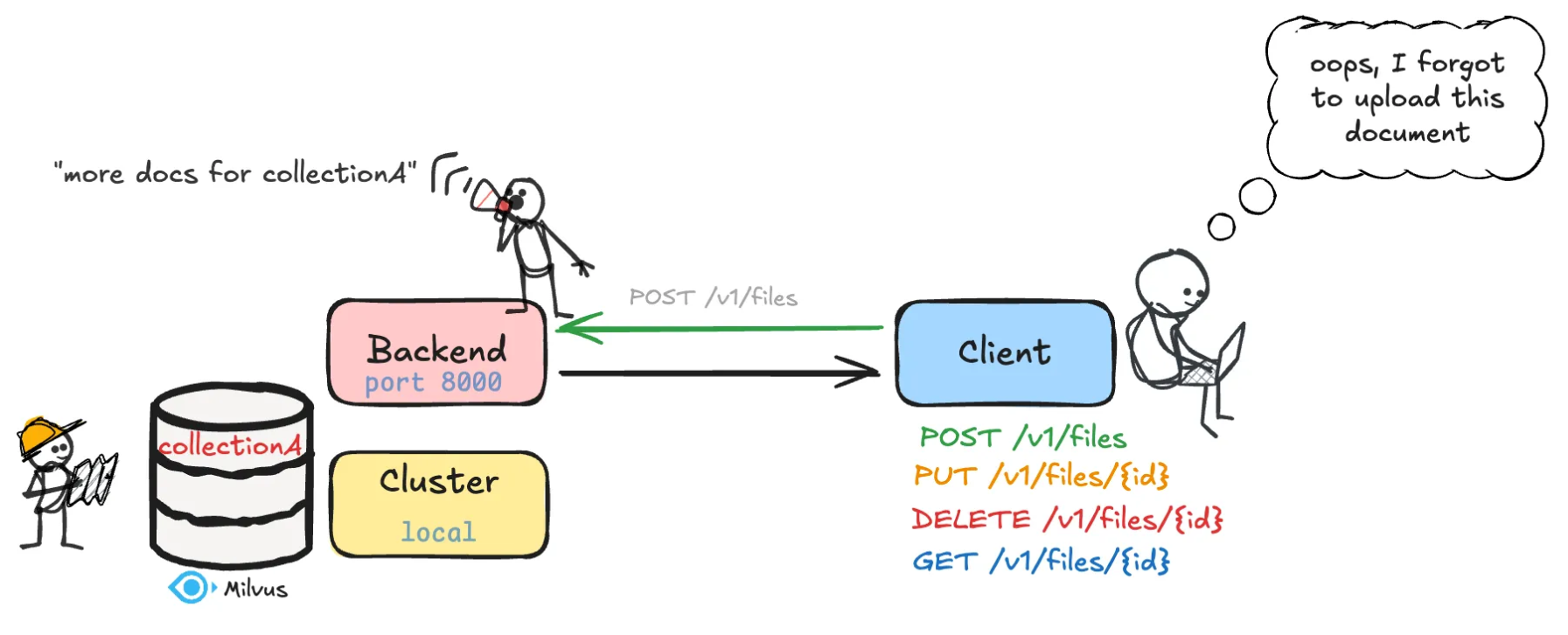
Overview
The Indexer API allows users to upload, update, download, delete, and index documents into a Milvus vector database for retrieval-augmented generation (RAG) and search applications.
Uploads are asynchronous: the upload endpoints validate the request, queue a background job, and return 202 Accepted with a jobId immediately. Processing and indexing then run in the background, one job per GPU. Clients track progress with the job status endpoints (snapshot or SSE stream).
⚙️ Backend server setup
Setup Instructions
1. Configure the server
The server reads everything from the YAML file passed with --config-file (a
RetrieverConfig). The relevant fields, with their defaults:
db:
  uri: ./proc_demo.db   # Milvus Lite file, or a Standalone server e.g. http://localhost:19530
  name: my_db
collection_name: my_docs
jobs_per_gpu: 1         # upload jobs processed per GPU at once
max_queue_size: null    # pending-job cap
2. Run the server
To start the server, run this command:
python3 -m mmore index-api --config-file /path/to/config.yaml --host the_host --port the_port
This command:
starts the Uvicorn ASGI server on the specified host and port
loads the FastAPI application from
src/mmore/run_index_api.py
Warning
Keep this terminal window open. The backend runs in the foreground, and closing the terminal will shut it down.
3. Concurrency and database
Uploads are processed by a background queue, one job per GPU (GPUs are auto-detected). Two config fields tune this:
jobs_per_gpu(default1): jobs processed per GPU at once. Total workers = GPUs *jobs_per_gpu.max_queue_size(defaultnull=num_gpu*jobs_per_gpu* 10): pending-job cap, uploads beyond it get503http error.
GPUs are auto-detected, but you can restrict which (and how many) mmore uses with the CUDA_VISIBLE_DEVICES environment variable:
# If you want to use only GPUs 0 and 2
CUDA_VISIBLE_DEVICES=0,2 python3 -m mmore index-api --config-file /path/to/config.yaml --host the_host --port the_port
Note
For jobs_per_gpu > 1, prefer a Milvus Standalone server
(db.uri: http://localhost:19530) over Milvus Lite. Milvus Standalone is better
suited to a production environment with concurrent load. Lite is fine for small or
local use. Keep jobs_per_gpu: 1 with Lite.
📂 API Usage
Upload endpoints
▶️ POST /v1/files
Upload a single file
Parameter |
Type |
Description |
|---|---|---|
|
|
Unique identifier for the file |
|
|
File content to upload |
rejects duplicate IDs with
409queues a background job, returns
202with ajobId
Response (202 Accepted):
{
  "jobId": "a1b2c3d4...",
  "fileId": "example123"
}
▶️ POST /v1/files/bulk
Upload multiple files with IDs
Parameter |
Type |
Description |
|---|---|---|
|
|
Comma-separated list of file IDs |
|
|
Files to upload |
validates 1-to-1 correspondence between files and IDs
queues one independent job per file, a bad file does not fail the batch
Response (202 Accepted):
{
  "jobs": [
    {"fileId": "doc1", "jobId": "a1b2c3..."},
    {"fileId": "doc2", "error": "already exists"}
  ]
}
🔁 Update Endpoint
✏️ PUT /v1/files/{fileId}
Replace an existing file and re-index
Parameter |
Type |
Description |
|---|---|---|
|
|
Existing file ID |
|
|
New file to replace with |
queues a background job, returns
202with ajobIdold vectors are replaced only after the new content is processed (no data loss on failure)
Response (202 Accepted):
{
  "jobId": "a1b2c3d4...",
  "fileId": "doc123"
}
🗑️ Delete endpoint
❌ DELETE /v1/files/{fileId}
Delete a file and remove its vector entry
Parameter |
Type |
Description |
|---|---|---|
|
|
ID of the file to delete |
deletes both local file and vector DB entry.
Response:
{
  "status": "success",
  "message": "File successfully deleted",
  "fileId": "doc123"
}
📥 Download endpoint
📄 GET /v1/files/{fileId}
Download a file by its ID
Parameter |
Type |
Description |
|---|---|---|
|
|
ID of the file to download |
Returns the file with binary content.
🛰️ Job status endpoints
Uploads return a jobId. Track it with either endpoint:
📊 GET /v1/jobs/{jobId}
One-shot status snapshot. Returns 404 if the job is unknown (e.g. expired).
{
  "jobId": "a1b2c3...", "fileId": "doc1", "filename": "doc.pdf",
  "status": "done", "device": "cuda:0",
  "result": {"chunks": 12}, "error": null
}
status is one of queued, processing, done, failed.
📡 GET /v1/jobs/{jobId}/events
Server-Sent Events stream. The server pushes each status change and closes when
the job is done or failed, so the client does not poll. Example with curl:
curl -N http://host:port/v1/jobs/a1b2c3.../events
Note
Job status is kept in memory and dropped a couple of hours after the job ends
(and on restart). The durable record of an indexed document is its presence in
the collection, not the jobId.
🔄 How it works
Upload → bytes are saved, a background job is queued,
202+jobIdreturns at onceProcess (on the job’s assigned GPU) → the file is processed
Crawling: files are parsed using
CrawlerDispatching: files are dispatched to the proper processor using
DispatcherProcessing: text, images, and metadata are extracted and returned as a
MultiModalSample
Indexing → dense and sparse vectors are stored in Milvus
The permanent file copy is saved only after indexing succeeds, then the job is marked
done
🧰 Developer notes
vector database: Milvus via
pymilvus.default embedding models:
dense:
sentence-transformers/all-MiniLM-L6-v2sparse:
splade
supported file types:
.pdf, .docx, .pptx, .md, .txt, .xlsx, .xls, .csv, .mp4, .avi, .mov, .mkv, .mp3, .wav, .aac, .eml, .html, .htm
💡 Tips
avoid duplicate
fileIdunless you are intentionally updating a file withPUTyou can test endpoints via Swagger UI at
/docs